training-labs
Common Issues
This page should serve as a quick reference to resolve some problems related to writing C++ code for these training labs.
Create a dedicated folder locally for this course
Make sure you save your code inside this dedicated course folder and set the correct file path for the Arduino IDE to read your code. To set this up, you can click (in the Arduino IDE) file->prefrences->sketchbook location and set it to the path of your course folder.
Unable to upload code to your Feather M0+ board
Double-click the reset button on your Feather M0+ board before uploading your code through the Arduino IDE if you are experiencing issues with finding your board through your computer’s port. You should also check if the USB cable is working properly.
Serial was not declared in this scope
Put #include "Arduino.h" in your .h or .cpp file in order to use Serial . Other datatypes or instances may require different
header files, such as “Adafruit_MCP9808.h”. To use Wire, put
#include "Wire.h" in your file (including your .ino sketch).
Unreasonable Thirmistor Temperature Reading
-
Ensure that the pin specified in
analogRead()corresponds to the actual pin you connected on the Feather board. (Ex. ChangeA1toA0if you connected A0 on the board)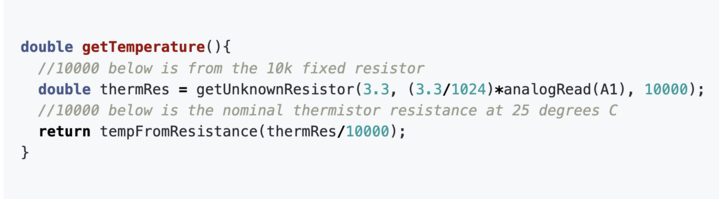
-
Verify whether you are using a 10k or 100k resistor and update the resistance value accordingly (the third parameter in
getUnknownResistor) ////////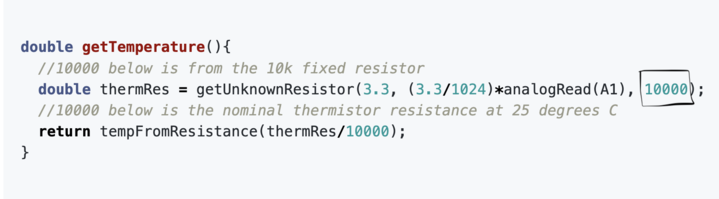
Weird temperature values from example code
In tempFromResistance, the starter code accidentally declared
int a, b, c, d;
and used double constants to initialize them. This caused a weird error that the compiler did not catch. You should change that line to
double a, b, c, d;
Temperature is nan (Not a Number)
You are probably passing a raw analogRead value, not a voltage, to
getUnknownResistor. This was a mistake in the example code that was
fixed by passing (3.3/1024)*analogRead(pin) to getUnknownResistor.
Room temperature is stuck around 2.86
An error in the datasheet was transferred to the starter code. There should
be E-0-3 in the old example code. It should be E-03.
Room temperature is around 290
That is correct. Room temperature is around 293.15K, which is about 20 degrees C.
Wire does not name a type
One way to see this compiler error is to try to use something like Wire.begin()
or Serial.println() outside of a function. This is because outside of
functions, you can essentially only declare, define, or instantiate things,
all of which require a data type.
//The following is outside of all functions, in the "global scope"

//Adafruit_MCP9808 is a datatype. We are instantiating a temperature sensor.
Adafruit_MCP9808 digitalTempSensorRaw();

//void is a datatype
void loop(){}

//We have declared class newClass, which is a custom datatype.
class newClass{
  public:
  void doSomething();
};//need a semicolon after class definition

//Serial is not a datatype. It is an instance of a class. This belongs inside a function.
Serial.println();
Adafruit_BusIO.h or adafruit_sensor.h not found
Try installing an older version of the Adafruit MCP9808 library. You can do this in the library manager: there is a drop-down menu. The library should prompt you to install those dependencies, but we found that a newer version did not give you that prompt.
Cannot convert uint16_t * to uint8_t *
This likely arose from a snippet like
uint16_t d_id;
uint8_t * t_p = &d_id;
Fix it by explicitly casting to the byte pointer (* means pointer) datatype.
uint16_t d_id;
uint8_t * t_p = (uint8_t *) &d_id;
No such module ‘matplotlib’, ‘pytz’, etc.
Install it using pip
Windows:
py -m pip install matplotlib
MacOS, Linux:
python3 -m pip install matplotlib
We also ran into an error on an M1 Max MacBook Pro where pip itself needed upgrading in order to install a package. You can upgrade packages (like pip) with
python3 -m pip install --upgrade pip