Introduction
Dragon Day is Cornell's beloved tradition where first year architecture students build a giant dragon and parade it across campus to battle the phoenix built by engineering students. We built Dragon Day Disaster: a two-player, physically-controlled game inspired by this rivalry. Each player straps an FRDM-KL46Z board to their body and physically jumps and ducks to control their character; one plays as the Dragon, the other as the Phoenix. Both characters race across the Cornell Arts Quad simultaneously, leaping over the iconic McGraw Clock Tower and ducking under the mysterious flying pumpkin from Cornell's famous 1998 pumpkin prank. The first player to get hit loses, making it a head-to-head survival race between two of Cornell's most legendary traditions!
We accomplished end-to-end embedded system integration: two boards independently sampling accelerometer data at 100Hz using real-time scheduling, detecting gestures through concurrent processes protected by spinlocks, and transmitting events over USB serial to a Python pygame game running on a laptop. We learned how to debug hardware communication from scratch, discovering that UART required SDK board file initialization, calibrating jump and duck thresholds from real accelerometer data, and implementing proper concurrent process architecture with shared memory protection. The biggest challenge was bridging the embedded system and the game reliably, which required careful threshold tuning, cooldown design, and serial protocol design.
System Overview
The system has two components: the FRDM-KL46Z board worn by the player, and a Python pygame script running on the laptop. The board reads accelerometer data, detects jumps and ducks, and sends serial events to the laptop which renders the game.
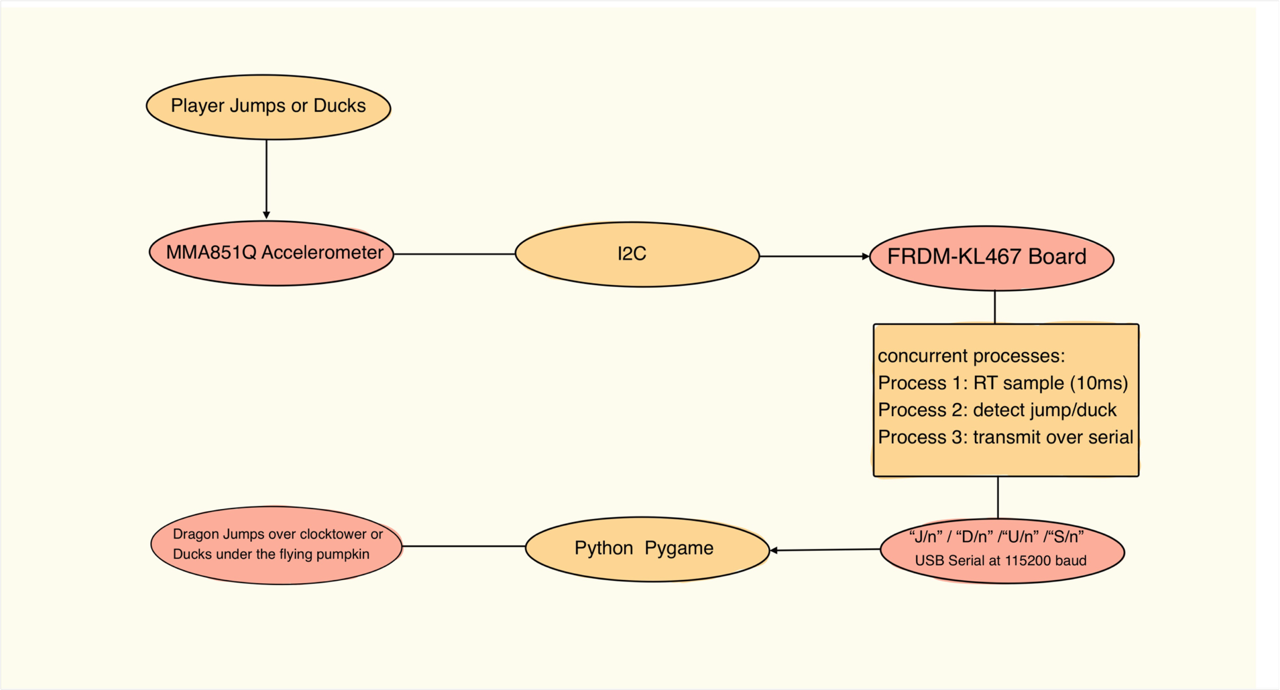
System Description
The system has two sides: the board side (C on FRDM-KL46Z) and the laptop side (Python pygame). Two boards run identical firmware: one for the Dragon player, one for the Phoenix player. Each board independently detects gestures and streams events over USB serial to the laptop, which runs a single Python script that reads both serial ports simultaneously and controls both characters in the game.
Board Side (C)
UART is initialized using the NXP SDK board files, specifically
BOARD_InitBootPins(), BOARD_InitBootClocks(), and
BOARD_InitDebugConsole(). This was a critical discovery during development:
the standard uart_init() from prior labs used incorrect pin mappings for this
board's virtual COM port. The SDK initialization correctly routes UART0 through the USB
debug cable.
The firmware uses three concurrent processes managed by the course concurrency library:
Process 1 (RT scheduled) created with process_rt_create(),
this process samples the MMA8451Q accelerometer over I2C continuously and writes the raw
X/Y/Z values into a shared buffer. It runs at the highest priority under the EDF
(Earliest Deadline First) real-time scheduler implemented in process.c.
Process 2 (Gesture Detection) reads Y-axis values from the shared buffer and applies threshold detection with cooldown counters to classify gestures. A jump is detected when Y spikes below −2900 (sharp upward jerk). A duck is detected when Y spikes above +600 (sharp downward jerk). Separate cooldown counters for jump and duck prevent double-triggering and stop landing impacts from being misclassified as ducks.
Process 3 (Serial Transmitter) monitors the shared jump and duck flags
set by Process 2 and sends the appropriate serial event to the laptop. It tracks the
previous duck state using a was_ducking flag so that D\n and
U\n are only sent once per transition rather than continuously.
A spinlock protects the shared accelerometer buffer between Process 1 (writer) and Process 2 (reader). The lock uses ARM's exclusive access instructions for atomicity:
void acquire(volatile int *lock) {
        while (*lock) {}
        *lock = 1;
    }

    void release(volatile int *lock) {
        *lock = 0;
    }
All shared flags (jump_flag, duck_flag, is_ducking)
are declared volatile to prevent the compiler from caching stale values across
process context switches.
The serial protocol between each board and the laptop:
| Message | Direction | Meaning |
|---|---|---|
S\n | Board → Laptop | Board ready — start game |
J\n | Board → Laptop | Jump detected |
D\n | Board → Laptop | Duck detected |
U\n | Board → Laptop | Unduck detected |
Laptop Side (Python)
The Python script opens two serial connections simultaneously (one per board) and spawns
a background reader thread for each using Python's threading module. Each thread
runs independently, decoding incoming lines and setting shared boolean flags
(jump_flag1, duck_flag1, jump_flag2, duck_flag2).
The main game loop reads these flags every frame at 30Hz.
The game is built in pygame. Both characters, Dragon (Player 1) and Phoenix (Player 2), share the same obstacle stream but have independent collision detection. The first character to collide with an obstacle loses. When a collision is detected, the background music stops, a death sound plays, and a full-screen win screen displays the winner. The game can be restarted immediately.
Obstacles spawn on a timer and include small cacti, large cacti, and birds at different heights, requiring a mix of jumping and ducking. Game speed increases gradually over time. Both players must react to the same obstacles but at their own pace since their X positions differ slightly, giving the leading player slightly less reaction time.
A calibration tool (calibrate.c) was built early in the project to stream raw
X/Y/Z values over serial so thresholds could be determined empirically by wearing the board
and performing gestures. The Y axis was identified as the primary gesture axis, with resting
values around −1900 and jump spikes reaching below −2900.
Testing
We tested each component individually before integrating the full system.
Accelerometer calibration : We built a standalone calibration tool
(calibrate.c) that streams raw X/Y/Z values over serial at 115200 baud
while the board is worn. By jumping, ducking, and moving normally, we identified the
Y axis as the primary gesture axis. At rest Y ≈ −1900. A jump causes a spike below
−2900. A duck causes a spike above +600. These values were used to set detection
thresholds in both calibrate.c and FinalProject.c.
Serial communication : We verified the serial pipeline end to end
using a Python terminal script before connecting to the game. We confirmed that
J\n, D\n, and U\n events appeared in the
terminal on every physical gesture. We tuned jump cooldowns to prevent double triggers
from a single jump landing, and set separate duck and jump cooldowns so that unduck
detection is fast while false duck detections from jump landings are blocked.
UART initialization : We discovered through systematic debugging
(adding numbered print statements to main) that the original uart_init()
from prior labs silently failed on this board configuration. By isolating each
initialization step we identified that the SDK's BOARD_InitBootPins(),
BOARD_InitBootClocks(), and BOARD_InitDebugConsole() were
required for serial to work correctly. The example UART code provided by course staff
confirmed this approach.
Concurrency and process creation : We debugged process creation
failures by checking return codes from process_create() and
process_rt_create(). We discovered that the default heap size in the
MCUXpresso linker script (0x800 = 2KB) was too small to allocate three process stacks.
We increased the heap size in FinalProject_Debug.ld to resolve this.
Game and collision detection : We tested the pygame game with keyboard controls (Up/Down for Dragon, W/S for Phoenix) before connecting the boards. This let us verify collision detection, win screens, obstacle spawning, death sounds, and music timing independently of the hardware. Once the game worked with keyboard input we swapped in the serial threads.
Two-player integration : With both boards connected, we ran the multi-board serial test script to confirm both boards were transmitting independently and correctly before launching the full game. We verified that each board's events only controlled its own character.
Resources
- NXP FRDM-KL46Z SDK and board files
- MMA8451Q accelerometer driver provided by course staff
- ECE 3140 lab files:
3140_accel,3140_i2c,3140_concur,process,realtime - UART example code provided by course staff (Prof. Nils Napp, 2021)
- pyserial and pygame Python libraries
- Python
threadingmodule for concurrent serial reading - ARM Architecture Reference Manual — exclusive access instructions (
LDREX/STREX) - NXP KL46Z Reference Manual — UART0, PIT timer, GPIO registers
Work Distribution
Ariel Lai
Board-side development: MCUXpresso project setup, accelerometer initialization over I2C, UART serial communication debugging, jump and duck gesture detection, threshold calibration from real accelerometer data, button start input, spinlock implementation, and two-board serial protocol design.
Rumman Jan
Python pygame game: dual serial reading threads, game rendering and sprite animation, collision detection, difficulty scaling, duck and unduck animation, two-player win screen, RT scheduling integration, concurrent process architecture, death sound and music integration, Phoenix sprite design.
We collaborated primarily in person and coordinated code through Git, pushing and pulling frequently so each person could review and build on the other's work. When one of us hit a bug or got stuck, we would push the current state and the other would pull and take a look. This worked well for the integration challenges we faced, such as debugging UART initialization and tuning gesture thresholds, where having a second pair of eyes on the code and on the physical board was essential. We divided ownership of the board side and the Python side early but collaborated closely during integration testing where both components had to work together reliably.
AI Usage
We used Claude (Anthropic) as a TA-style assistant throughout the project, in compliance with course guidelines. It helped debug UART configuration issues (identifying that the project required Default Board Files and SDK initialization), identify the correct pin mapping for serial communication, structure the jump and duck detection logic, implement the atomic spinlock using ARM exclusive access instructions, set up the GitHub repository, and draft documentation.