info1300-2023fa-documents
Introductory Design and Programming for the Web (Fall 2023)
Course Number: INFO1300
Credits: 4, Letter Grade
Prerequisites: None
Expected Weekly Workload: 8 hours/week outside class
Instructors:
- Dr. Kyle Harms (he/him); https://kharms.infosci.cornell.edu
- Dr. Benjamin Soltoff (he/him); https://www.bensoltoff.com
We want you to be successful and learn in this class. We’ve structured this class and its policies with these goals in mind. Things might get a bit challenging at times, but please remember that we’re here to support you through your learning journey!
Course Website: https://canvas.cornell.edu/courses/55546
Course Email: info1300@cornell.edu
Please send all communication to the course email; please do not directly email or contact any of the course staff, including the instructors and TAs. We strive to respond to each email within 48 hours, during business hours (Monday-Friday, 9am-4pm).
Lectures: Mondays, Wednesdays, 8:40am-9:55am, Bailey Hall 101 (28 total)
Lab (Discussion) Sections: Fridays, 50 minutes (14 total). See the Class Roster for details.
Office Hours: Office Hour Calendar
Required Materials: A functioning laptop for class. Please email info1300@cornell.edu if this is an issue.
Recommended Textbooks:
| Title | Author | ISBN | Full Text |
|---|---|---|---|
| HTML and CSS: Design and Build Websites | Jon Duckett | 978-1118008188 | Cornell Libraries |
InfoSci Majors: If you already know this material, please waive this course.
CS Majors: This class is about design and programming; not just programming. Design and user experience are significant components of this course. Please note this class assumes you have little prior programming experience; this course is likely not appropriate for CS students with significant programming experience.
Table of Contents
- Introductory Design and Programming for the Web (Fall 2023)
- 2. Schedule
- 3. Policies
1.1. Course Description
This course is designed to introduce students to the conceptual, design, and technical aspects of developing front-end websites. No prior knowledge of programming, or web design is assumed nor necessary. In the course, we will cover basic web technologies such as HyperText Markup Language (HTML), Cascading StyleSheets (CSS), and some JavaScript (JS).
We will also cover theories and principles that will help you become a better UX designer. This includes information, visual, and interaction design principles; usability and user testing principles and processes; and tools and techniques for working with clients and other users.
Design, inclusivity, and usability issues are emphasized.
1.2. Course Objectives
By the end of the course, a student will be able to:
- Develop competency in accessible client-side/front-end static web development.
- Use HTML to structure content (structural layer), CSS to style content (presentation layer), and JavaScript for client-side interactivity (behavioral layer).
- Implement client-side interactivity using JavaScript snippets to dynamically change the structural and presentation layers.
- Employ the user-centered design process to design static websites for a specific audience.
- Design and implement usable responsive websites for mobile and desktop devices.
- Organize content and design usable navigation (information architecture).
- Design usable websites leveraging the visual design principles of color, contrast, typography, proximity, alignment, hierarchy, repetition and consistency.
- Utilize reference documentation to solve programming problems.
1.3. Course Structure & Assignments
This is a project-oriented class. There are 3 individual projects and a group project, each with 2-3 milestones, and 14 lab homework assignments. Every week you will be expected to complete a lab homework assignment and submit a project milestone.
The primary source of information in this class comes from lectures with in-class activities, and Friday lab (discussion) sections. Attending class regularly is important to your overall success in this class.
There is no final exam for this course. There are no other exams or prelims.
1.4. A Typical Week in this Course
Keeping up with the material in this course is essential to your success. This course uses a predictable weekly rhythm to help you keep up.
| Day | Class | Deadlines | Assigned |
|---|---|---|---|
| Monday | Lecture, 8:40am | ||
| Tuesday | |||
| Wednesday | Lecture, 8:40am | Project Milestone, 11:59pm | |
| Thursday | Project Milestone, noon | ||
| Friday | Lab Section | Lab Homework, 9:00am | |
| Saturday | |||
| Sunday | Lab Homework, 11:59pm |
2. Schedule
This class schedule is tentative and is subject to change.
| Date | Plan |
|---|---|
| Week 1 | Welcome, The Web, HTML |
| 8/21 (Mon) | • Instruction Begins |
| • Class: Introduction, Static Websites, Development Environment | |
| 8/23 (Wed) | • Class: Structuring Content with HTML |
| • Assigned: Lab Homework 1 (lab1) | |
| 8/24 (Thu) | • Assigned: Project 1 (p1m1, p1m2, p1m3, p1fin) |
| 8/25 (Fri) | • Lab: Development Environment Configuration, HTML |
| 8/27 (Sun) | • Deadline: Lab Homework 1 (lab1) |
| Week 2 | URLs, Navigation, Images |
| 8/28 (Mon) | • Class: Multi-Page Websites, URLs, & Navigation |
| 8/30 (Wed) | • Class: Content Organization (Card Sorting), Images |
| • Deadline: Project 1, Milestone 1 (p1m1) | |
| 9/1 (Fri) | • Assigned: Lab Homework 2 (lab2) |
| • Lab: Content Organization, Navigation, and Images | |
| • Deadline: Lab Homework 2 (lab2) | |
| Week 3 | CSS |
| 9/4 (Mon) | • Labor Day / No Class |
| 9/5 (Tue) | • Last day to add classes/change credits |
| 9/6 (Wed) | • Class: Introduction to CSS |
| 9/7 (Thu) | • Deadline: Project 1, Milestone 2 (p1m2) |
| 9/8 (Fri) | • Assigned: Lab Homework 3 (lab3) |
| • Lab: CSS Practice | |
| 9/10 (Sun) | • Deadline: Lab Homework 3 (lab3) |
| Week 4 | Design a Theme, Box Model |
| 9/11 (Mon) | • Class: CSS for a Website’s Theme |
| 9/13 (Wed) | • Class: Designing Layout & The Box Model |
| • Deadline: Project 1, Milestone 2 (p1m3) | |
| 9/15 (Fri) | • Assigned: Lab Homework 4 (lab4) |
| • Lab: Visual Theming with CSS | |
| 9/17 (Sun) | • Deadline: Lab Homework 4 (lab4) |
| Week 5 | Layout with Flexbox, Responsive Web Design |
| 9/18 (Mon) | • Class: Layout with Flexbox |
| 9/20 (Wed) | • Class: Responsive Web Design |
| • Deadline: Project 1, Final Submission (p1fin) | |
| 9/22 (Fri) | • Assigned: Lab Homework 5 (lab5) |
| • Lab: Flexbox Practice | |
| • Deadline: Lab Homework 5 (lab5) | |
| Week 6 | Visual Design, User Interviews |
| 9/25 (Mon) | • Class: Principles of Visual Design |
| 9/27 (Wed) | • Class: User Research - User Interviews |
| 9/28 (Thu) | • Assigned: Project 2 (p2m1, p2fin) |
| 9/29 (Fri) | • Assigned: Lab Homework 6 (lab6) |
| • Lab: User Interviews | |
| • Apple Harvest Festival Begins | |
| 10/1 (Sun) | • Deadline: Lab Homework 6 (lab6) |
| • Apple Harvest Festival Ends | |
| Week 7 | Media Queries |
| 10/2 (Mon) | • Class: Responsive Methods - Media Queries |
| 10/4 (Wed) | • Class: Project 2, Milestone 2 |
| • Deadline: Project 2, Milestone 1 (p2m1) | |
| 10/6 (Fri) | • Assigned: Lab Homework 7 (lab7) |
| • Lab: Responsive Design & Media Queries | |
| 10/7 (Sat) | • Fall Break Begins |
| Week 8 | User Testing |
| 10/9 (Mon) | • Indigenous Peoples’ Day |
| 10/10 (Tue) | • Fall Break Ends |
| 10/11 (Wed) | • Class: User Testing |
| 10/13 (Fri) | • Lab: Project 2 Feedback |
| 10/15 (Sun) | • Deadline: Lab Homework 7 (lab7) |
| Week 9 | Teamwork & Git |
| 10/16 (Mon) | • Last day to drop classes/change grading basis |
| • Class: Collaborating with Git | |
| 10/18 (Wed) | • Class: Effective Teamwork |
| • Deadline: Project 2, Final Submission (p2fin) | |
| 10/19 (Thu) | • Assigned: Group Project (pgm1, pgm2, pgfin) |
| 10/20 (Fri) | • Assigned: Lab Homework 9 (lab9) |
| • Lab: Git in Teams | |
| 10/22 (Sun) | • Deadline: Lab Homework 9 (lab9) |
| Week 10 | Designing & Planning Interactivity |
| 10/23 (Mon) | • Class: Design Usable Interactivity |
| 10/25 (Wed) | • Class: Planning Website Interactivity |
| • Deadline: Group Project, Milestone 1 (pgm1) | |
| 10/27 (Fri) | • Assigned: Lab Homework 10 (lab10) |
| • Lab: Planning Interactivity | |
| 10/29 (Sun) | • Deadline: Lab Homework 10 (lab10) |
| Week 11 | Implementing Interactivity |
| 10/30 (Mon) | • Class: Introduction to JavaScript for Interactivity |
| 11/1 (Wed) | • Class: Coding Interactivity Using Snippets |
| • Deadline: Project 3, Milestone 1 (p3m1) | |
| 11/3 (Fri) | • Assigned: Lab Homework 11 (lab11) |
| • Lab: JavaScript Interactivity Snippets | |
| 11/5 (Sun) | • Deadline: Lab Homework 11 (lab11) |
| Week 12 | Accessible Interactivity |
| 11/6 (Mon) | • Class: Project 3 Help |
| 11/8 (Wed) | • Class: Accessible Client-Side Interactivity |
| • Deadline: Project 3, Final Submission (p3fin) | |
| 11/10 (Fri) | • Assigned: Lab Homework 12 (lab12) |
| • Lab: Group Project Time | |
| 11/12 (Sun) | • Deadline: Lab Homework 12 (lab12) |
| Week 13 | Publishing a Static Website |
| 11/13 (Mon) | • Class: Search Engine Optimization (SEO) |
| 11/15 (Wed) | • Class: Publishing a Static Website |
| • Deadline: Group Project, Milestone 2 (pgm2) | |
| 11/17 (Fri) | • Assigned: Lab Homework 13 (lab13) |
| • Lab: Publish a Website | |
| 11/19 (Sun) | • Deadline: Lab Homework 13 (lab13) |
| Week 14 | Office Hours |
| 11/20 (Mon) | • Class: Group Project Office Hours |
| 11/22 (Wed) | • Thanksgiving Break Begins |
| 11/26 (Sun) | • Thanksgiving Break Ends |
| Week 15 | Accessibility, Animations |
| 11/27 (Mon) | • Class: Accessibility for Websites |
| 11/29 (Wed) | • Class: Usable Web Animation |
| • Deadline: Group Project, Final Submission (pgfin) | |
| 12/1 (Fri) | • Assigned: Lab Homework 14 (lab14) |
| • Lab: Group Project Demonstrations | |
| 12/3 (Sun) | • Deadline: Lab Homework 14 (lab14) |
| Week 16 | Video |
| 12/4 (Mon) | • Last Day of Classes |
| • Class: Usable & Accessible Web Video | |
| • Deadline: Last day to submit all late work |
3. Policies
3.1. Policy Summary
The course policies aren’t meant to be confusing. However, we receive a lot of questions about them. We’ve added a lot of detail in the sections below at the request of students.
The course policies can be summarized as the following:
Contacting Us:
- Please email info1300@cornell.edu to contact the instructors or the course staff.
- Please do not directly contact or email the course staff.
Inclusivity & Accommodations:
- Everyone belongs in this class. Please email info1300@cornell.edu if we have failed to live up to this goal. We will address it.
- Please contact us if you need additional flexibility/accommodations. The sooner, the better.
- Request accommodations/considerations in-advance; per university policy, accommodations or considerations are not retro-active.
Class Participation:
- Historically, students that regularly arrive to class on-time and participate in class, perform significantly better and experience less difficulty completing projects and assignments.
- Credit is provided for participating in the in-class activities during lectures and lab sections.
- You may miss (or arrive late) to 4 classes (lectures or labs) without penalty to your grade.
- Please catch up with a peer if you miss class.
- Please do not record lecture or take photographs without the permission of the instructor. Doing so violates the privacy of the attendees.
Assignments & Late Work:
- To submit assignments 1) push your work to GitHub and 2) fill out the course submission form.
- Most assignments permit you to submit them late using slip days. See each assignment for details.
- You have a total 4 slip days to use for the entire semester.
- If the slip days are not meeting your accommodation needs, please email info1300@cornell.edu to inquire about a deadline extension accommodation.
Grades:
- All assignments are graded once; we are unable to accept resubmissions, redos, or do-overs.
- Submit a grade clarification request if you don’t understand your grade on an assignment. Please see the process below.
- Submit a regrade request if there is a mistake with your grade on an assignment. Please see the process below.
- For participation related grading issues, please email info1300@cornell.edu.
Getting Help:
- Learning to troubleshoot your own code is a critical skill you need to learn to be a successful web designer and programmer. Please try and troubleshoot your own coding problems before seeking help.
- You are encouraged to collaborate/work with your peers in this class so long as you do your own work. Do not copy code or share solutions.
- When getting help, please keep in mind that we prioritize helping you learn, not fixing your code for you.
- The best place to get help with an assignment is from your peers and office hours. Please make regular use of the help resources in this class.
- The best place to get help with an idea or concept is posting a question to Ed Discussions. Please avoid using Ed Discussions for code troubleshooting.
Academic Integrity:
- Submit your own work.
- You are encouraged to discuss and collaborate with your peers. However, you may not share or copy code.
- You are encouraged to seek out and use additional resources to help you complete assignments.
- You are encouraged to use additional resources as a reference: study the resource so that you understand it and can use the same ideas in your project/code independently.
- Cite any work (text, images, videos, etc.) that is not your own.
- Please cite any resources you referenced to complete your work.
3.2. Inclusivity & Accommodations
We want you to feel like you belong in this class and are respected. Cornell University (as an institution) and we (as a human beings and instructors of this course) are committed to full inclusion in education for all persons. If for any reason you feel that we have failed these goals, please either let us know or report it, and we will address the issue.
Services and reasonable accommodations are available to persons with temporary and permanent disabilities, to students with DACA or undocumented status, to students facing mental health or other personal challenges, and to students with other kinds of learning challenges. Please feel free to let us know if there are circumstances affecting your ability to participate in class.
Some resources that might be of use include:
- Office of Student Disability Services: https://sds.cornell.edu
- Cornell Health CAPS (Counseling & Psychological Services): https://health.cornell.edu/services/counseling-psychiatry
- Undocumented/DACA Student support: https://dos.cornell.edu/undocumented-daca-support/undergraduate-admissions-financial-aid
3.2.1. Academic Accommodations
We want all students to have the opportunity to be successful in this course. Accommodations are provided in support of equitable classroom access.
Per university policy, this course provides the following accommodations:
- Disability Accommodations
- Religious-Observance Accommodations
- Title IX Accommodations
- Varsity Athlete Accommodations
- Medical Accommodations
- Military Service
- Other Accommodations
This course has built-in deadline (slip days) and participation flexibility (excused absences). This flexibility is specifically intended to support most student accommodation needs (e.g. medical issues, family emergencies, religious observance, athletic participation, etc.)
If you need additional accommodations beyond the already provided flexibility, please contact info1300@cornell.edu. We will work with you to provide accommodations or considerations to help you succeed in this course. Please contact us. The sooner, the better (per university policy, accommodations are not applied retro-actively.)
3.3. Class Participation (Attendance & Absences)
We care about your success in this course. The single most important thing you can do as a student to be successful in this class is to come to class prepared, arrive to class on time, and attend class regularly.
Historically, students that attend class regularly perform significantly better and experience less difficulty completing their projects and assignments compared to their peers that don’t attend class or come to class unprepared.
Credit is provided for participating in the in-class activities during lectures and lab sections. Credit for in-class participation is a proxy for the learning that happens during class. Because arriving late to class disrupts the learning of other students, please arrive within 10 minutes of the start of class (lecture and lab sections) to receive your participation credit.
If this participation policy is not meeting your needs, please seek academic accommodations.
Note: Late arrival to class may receive partial participation credit, at the discretion of the instructor.
3.3.1. Excused Absences
We understand that sometimes you won’t make it class or may arrive late to class, and that some flexibility is needed.
You may miss (or arrive late) to 4 6 classes (lectures or labs) without penalty to your grade. (15 weeks in a semester × 3 classes per week × 90% 85% = ~6 missed classes)
These excused absences are specifically for legitimate reasons for missing class. Per university policy, an excused absence may be warranted by: disability, religious observance, Title IX, student athletics, medical problems, and military service.
If you need to miss more classes than this policy permits, please seek academic accommodations.
How to use your excused absences:
- Simply don’t come to class (or arrive late to class.) You don’t need to do anything else.
- Your lowest 4 participation grades will be dropped at the end of the semester.
- Please keep your personal information private.
- There is no need to share why you are missing class.
- Please do not send documentation about your absence to the instructors.
3.3.2. Catching-up if You Miss Class
If you miss class, the best way to catch-up is to connect with a peer from the course. Arrange a time to meet and go through the notes (please don’t just copy them) and practice the in-class activities together. This benefits the learning of both you and your peer.
We do not recommend relying solely on posted slides to catch-up for missed classes. Unfortunately, slides are not a substitute for the learning that occurs during class.
3.3.3. Laptop and Cellphone Usage, Recording During Class
We care about your learning and distractions get in the way of that goal. Students that take notes by hand learn better (i.e. retention and performance) compared to their peers that take notes on their laptops. You are encouraged to take notes by hand.
Please don’t use your phone during class. Cellphones are distracting in the classroom and may inhibit your learning and that of your peers.
Please do not record or take photos during class without the explicit permission of the instructor. Recording someone without their permission is an invasion of their privacy; please respect the privacy of your peers and the course staff.
3.4. Deadlines & Late Work (Slip Days & Deadline Extensions)
We want you to be successful in this class. Historically, students that submit their work on-time, tend to do better in this course.
Assignments must be fully submitted (pushed to GitHub and submission form completed) for credit. Your assignment’s submission time is the date and time you complete the submission form.
3.4.1. Late Work
Try your best to submit assignments on time. But don’t panic if you need to submit an assignment late; we provide some deadline flexibility for these situations.
You may submit an assignment late without penalty by using your slip days, if permitted by the assignment (see additional details below).
Otherwise, late assignments are graded at 70% credit. If you submit after the slip-day deadline (deadline + permitted slip days) or you submit after the assignment’s deadline, but you’re out of slip days, your assignment is considered late and will be graded at 70% credit. All late work must be received by the last day of classes for the semester for credit.
Note: Project milestones graded for completion are not eligible for late submission after the final submission has been submitted.
Important! If you wish to submit an assignment late, you are required to email info1300@cornell.edu to notify the course staff that we should grade your late submission. If you fail to notify us of your late submission, we won’t know to grade your late work, and you will not receive late credit for it.
Note: Any pre-class preparation and in-class participation are not assignments and are therefore not eligible for late submission.
3.4.2. Slip Days
If you need to submit an assignment a day or so late, slip days can provide that flexibility. A slip day allows you to submit an assignment 24 hours after the deadline and still receive credit without a late penalty.
You are provided with a total of 4 6 slip days for the entire semester. You may use your slip days on any assignment provided that you have available slip days and the assignment write-up permits slip days. (Each assignment states how many slip days you may use.)
To use your slip days, simply submit your assignment late. There is no need to email us when submitting with your slip days.
Check Canvas to see how many of your slip days you have used before submitting an assignment late. If you submit an assignment late without any available slip days or the assignment does not permit slip days, your assignment will be graded as a late submission (see the late work policy).
3.4.3. Deadline Extensions
If you need a bit of extra time, please use your slip days. Slip days are specifically intended for legitimate reasons for needing an extension like disability, religious observance, Title IX, student athletics, medical concerns, military service, and a death in the family.
If using your slip days for accommodations/considerations is not working for you, let us know by requesting a deadline extension in-advance of the deadline. We will work with you to develop reasonable accommodations/considerations that align with your individual situation.
To request a deadline extension:
- Commit and push the work you have completed up to this point on the assignment (please do not complete the submission form).
-
Email info1300@cornell.edu well in-advance of the deadline.
In your email please clearly state:
- The assignment (e.g. p2m1).
- What you have already completed on the assignment.
- What you have left to complete.
- Your proposed deadline extension (e.g. Monday, February 8th at 11:59pm.)
Please do not reveal personal information in your request. We respect your privacy.
3.5. Getting Help
We want you to get the help you need to be successful in this course.
The students that do well in this course typically start assignments early and get help early.
When getting help, please keep in mind that we prioritize helping you learn, not giving out answers or fixing your code for you.
3.5.1. Student Collaboration
We want you to develop a peer support network in this class.
You are encouraged to work with and support other students in the class so long as you do your own work. You may help each other on your homework and projects. You may ask another student to review your design and critique it. However, do your own work, and do not copy code or share solutions. (Please see the “Copying Code” section below.)
3.5.2. Where to Get Help / Office Hours
How to get help on this assignment:
-
Ask a peer in the course for help.
Working with your peers is one of the best ways to get help in this course. Helping a peer improves your learning and theirs!
-
Attend TA Office Hours.
Office hours are the best way to seek help in this course. You are encouraged to make regular use of office hours and work with your peers during office hours.
Current office hours are posted to the office hour schedule.
Start assignments early and seek help early; office hours before deadlines are often packed.
-
Post a public question on Ed Discussions (See link in Canvas).
Do you have a general question about the course material or an assignment? The course Q&A forum is the best place to receive clarification on course content.
If you need help with an assignment/project, please seek help with a peer or visit office hours. We want to help you, but it’s often difficult for us to effectively help you with your code in online forum.
TAs prioritize helping students in office hours first then answering questions on Ed. We try to respond to your questions within 48 hours, during business hours (Monday-Friday, 9am-4pm).
-
Attend the instructors’ office hours.
The instructors’ office hours are always open. Please feel free to stop by for anything. We are always happy to help you with any problem no matter how big or small.
Please check the instructors’ websites for current office hour times.
-
Please do not email info1300@cornell.edu, the instructors, or the TAs for help with an assignment/project. Please use the above methods.
3.6. Grades
Your grade is computed using the following weighted averages.
| Component | Grading | Weight |
|---|---|---|
| Participation | ||
| • Class Participation | Completion | 7% |
| Assignments | ||
| • Pre-Class Preparation | Completion | 3% |
| • Lab Homeworks | Completion | 14% |
| • Project 1 | Correctness | 18% |
| • Project 2 | Correctness | 22% |
| • Project 3 | Correctness | 16% |
| • Group Project | Correctness | 20% |
We grade to a scale, not to a curve, and we do not round grades. Like your GPA, letter grades are assigned by the integer-part of your percentage; the decimal-part is not a factor. For example: 96.01, 96.5, and 96.99 are all A’s. 97.0 is an A+.
| Letter | Percent | Letter | Percent | Letter | Percent | Letter | Percent |
|---|---|---|---|---|---|---|---|
| A+ | 97-100% | B+ | 87-89% | C+ | 77-79% | D+ | 67-69% |
| A | 93-96% | B | 83-86% | C | 73-76% | D | 63-66% |
| A- | 90-92% | B- | 80-82% | C- | 70-72% | D- | 60-62% |
| F | 0-59% |
3.6.1. Resubmissions, “Redos”, or “Do-Overs”
Please understand that mistakes are natural part of the learning process. We’ve structured the course to help you learn from your mistakes without significantly impacting your grade.
Given that the course structure is designed to reduce the impact of mistakes on your grade, no resubmissions, redos, or do-overs are accepted. Please be aware that we grade each assignment exactly once.
3.6.2. Grade Corrections (Regrades)
We want your grade to reflect what you’ve learned in this class.
- If you have a question about your grade, please submit a grade clarification request.
- If there was a mistake with your grade, please submit a regrade request.
- For all other grade inquiries (class participation, pre-class prep) please email info1300@cornell.edu.
3.6.3. Grade Clarification Requests (Grading Questions)
If you’re unsure about why you got the grade you did, please submit a grade clarification request. We’ll help you understand your grade.
Copy the template below into an email and replace all TODOs. Send that email to info1300@cornell.edu.
Subject:
(REQUEST) Grade Clarification
Email Message Template:
NetID: TODO
Assignment: TODOBrief explanation of what you would like clarified about your grade (1-3 sentences):
Be concise and to the point. State what you would like clarified directly.
(If you want points returned, please submit a regrade request.)TODO
3.6.4. Regrade Requests (Grading Mistakes)
If you believe that you received an incorrect grade, please submit a regrade request.
Regrade requests are intended for correcting grading mistakes. Your entire assignment will be regraded. It is possible (though unlikely) to receive a lower grade than the original one you were given.
Follow these steps to submit a regrade request:
-
Email us your regrade request.
Copy the template below into an email and replace all TODOs. Send that email to info1300@cornell.edu.
Subject:
(REQUEST) Regrade
Email Message Template:
NetID: TODO
Assignment: TODODirectly state the mistake(s) in the grading of your assignment. Be specific and specify the total points that you believed should be returned for each mistake. (1-3 brief and concise bullets):
TODO
(optional) If necessary, briefly explain why your approach to this assignment is a good choice (1-3 brief and concise bullets):
TODO
Tips:
- When writing, please be respectful, thoughtful, and professional.
- Be brief and concise. Bullet points are encouraged. Please do not write a lengthy explanation.
- Form and ground your argument based on ideas and principles presented in this course. This is the primary criteria we use to evaluate your regrade request.
-
Please be patient.
It usually takes us several weeks to process a regrade request.
Once we process it, we will reply to your regrade request email to notify you of the outcome.
3.7. Citing Resources
You are permitted and encouraged to seek out additional resources or sources of information for this class. However, you must cite each resource you use.
3.7.1. Citing Reference Resources
If you use a resource to help you complete an assignment (i.e. example, documentation, tutorial, etc.), cite the URL of the resource in a comment near where you used it in your code.
Note: There is no need to cite instructor provided code or examples in your submissions.
3.7.2. Citing Content Resources
Cite all website content according to this flow-chart:
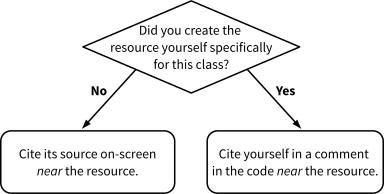
Every resource (text, images, videos, etc.) must be cited according to this policy; each resource must be cited individually.
Citing External Resources: Please cite any resources you use or reference that you did not create yourself specifically for this class (external resource). The citation must be public (i.e. visible in the browser) and near the resource. There is no required citation format.
Example (There is no required citation format; this is just one possible way to cite.):
<!-- Source: https://www.example.com/image.png -->
<img src="image.png" alt="Example Image">
Source: <cite><a href="https://www.example.com/image.png">Example-o-Rama</a></cite>
Citing Internal Resources: For resources that you created specifically for this class, you don’t need to cite them publicly (i.e. visible in the browser), but you do need to let us know you created it in a comment near the resource in the code (so we know you didn’t forget to cite them.)
Example (There is no required citation format; this is just one possible way to cite.):
<!-- Source: (original work) Kyle Harms -->
<img src="image.png" alt="Example Image">
Please cite the original source who created the resource; please do not cite where you found the resource.
If you don’t provide credit/attribution in your submission, you’re basically claiming someone else’s work as your own. That’s not okay. Each missing citation will receive a point deduction.
3.8. Academic Integrity & Copying Code
Each student in this course is expected to abide by the Cornell University Code of Academic Integrity.
-
Submit your own work.
Submitting work that isn’t your own may result in a 0 for the offending assignment.
-
You are encouraged to discuss and collaborate with your peers.
However, you may not share or copy code.
-
You are encouraged to seek out and use additional resources to help you complete your assignments.
Please feel free to use the instructor provided examples, Mozilla documentation, and other resources you find (e.g. example code, StackOverflow, ChatGPT, tutorials, etc.)
Please note that you still need to submit your own work. You may not copy someone else’s work, including work produced by generative AI, and submit it as your own. This includes submitting the instructor provided examples as your own work.
-
We encourage you to use additional resources as a reference rather than for copying code.
Using a resource as a reference means you study the resource so that you understand it and can use the same ideas in your project/code independently.
While it’s tempting to copy code from elsewhere and modify it to suit your purposes, modifying code and writing code from scratch are two distinct skills. You’ll learn more if you study a resource’s code and try and implement the same ideas independently in your code!
-
Cite all resources you used in writing your code near where you used the resource.
Leave a comment in your code wherever you used a resource to help you write your code. In the comment specify the URL of resource you used.
Note: You are not required to cite instructor provided code or examples in your submission.
-
You may not circulate or sell the course materials.
All materials of this course are copyrighted, and it is prohibited to circulate or sell to commercial vendors the course materials, including syllabus, exams, lecture notes, images, presentations, and student papers. Such unauthorized behavior violates the Code of Academic Integrity.
Video and/or audio recording of class lectures and review sessions without my permission in advance is prohibited. If you have an accommodation letter from Student Disability Services or if you are interested in recording for your personal use as a study aid, please discuss it with an instructor before recording anything.