ff267-yz2788
ECE3140 Final Project for Felicia (ff267) & Yihan (yz2788)!
💃🕺🪩 Shake It Up! 🪩🕺💃

Introduction
Shake It Up! is a rhythm game for the FRDM-KL46Z. The player holds the board and swings it Up / Down / Left / Right in time with falling arrows on a Python-driven screen; the on-board MMA8451Q accelerometer detects each swing and the PC scores it as PERFECT, GOOD, or MISS. The board owns sensing + DSP + grading. The PC owns the song, the beatmap, and the visuals. The two halves talk over UART — either via the OpenSDA USB-CDC bridge or an HC-06 Bluetooth module, selected by a single compile-time flag.
Inspired by Just Dance, we wanted to see how much of a real rhythm game a small embedded board can do without a camera, an OS, or external sensors. Most of the technical interest ended up in two places: the on-board DSP that turns a stream of XYZ samples into one of {U, D, L, R, none}, and the host↔board wire protocol that has to keep two unsynchronized clocks within a few milliseconds of each other across an entire song.
System Overview
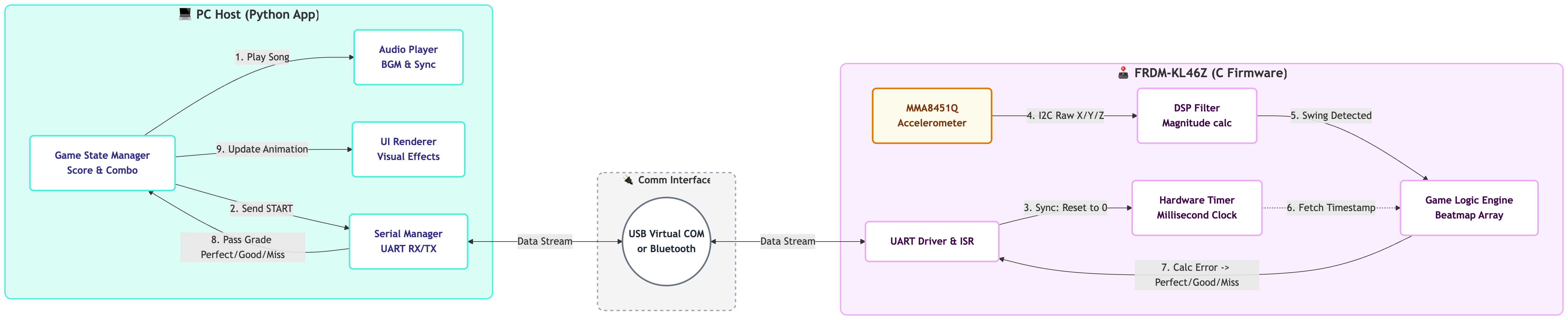
Figure 1: System architecture overview
Three concerns split cleanly across the two devices:
| Layer | Where | What |
|---|---|---|
| Sensing + DSP | KL46Z | I2C poll → EMA gravity removal → magnitude state machine → direction |
| Judging | KL46Z | 16-slot beat queue, perfect/good/miss windows, auto-miss timeout |
| Audio + UI + scoring | PC | pygame audio cursor, falling-arrow renderer, score / combo / rank |
The board is the source of truth for when and what direction. The host is the source of truth for which beat and the audio cursor. A SYN/ACK protocol every five seconds keeps the host’s wall-clock and the board’s PIT-driven millis() aligned to within a few ms.
System Description
Hardware
Standard FRDM-KL46Z with on-board MMA8451Q accelerometer (I2C0, 800 Hz ODR). For wireless play we add an HC-06 module on either UART2 (Debug build, J3 pins) or UART0 (BT build, J1 pins — shared with the OpenSDA bridge, so USB-serial and Bluetooth don’t run at the same time).
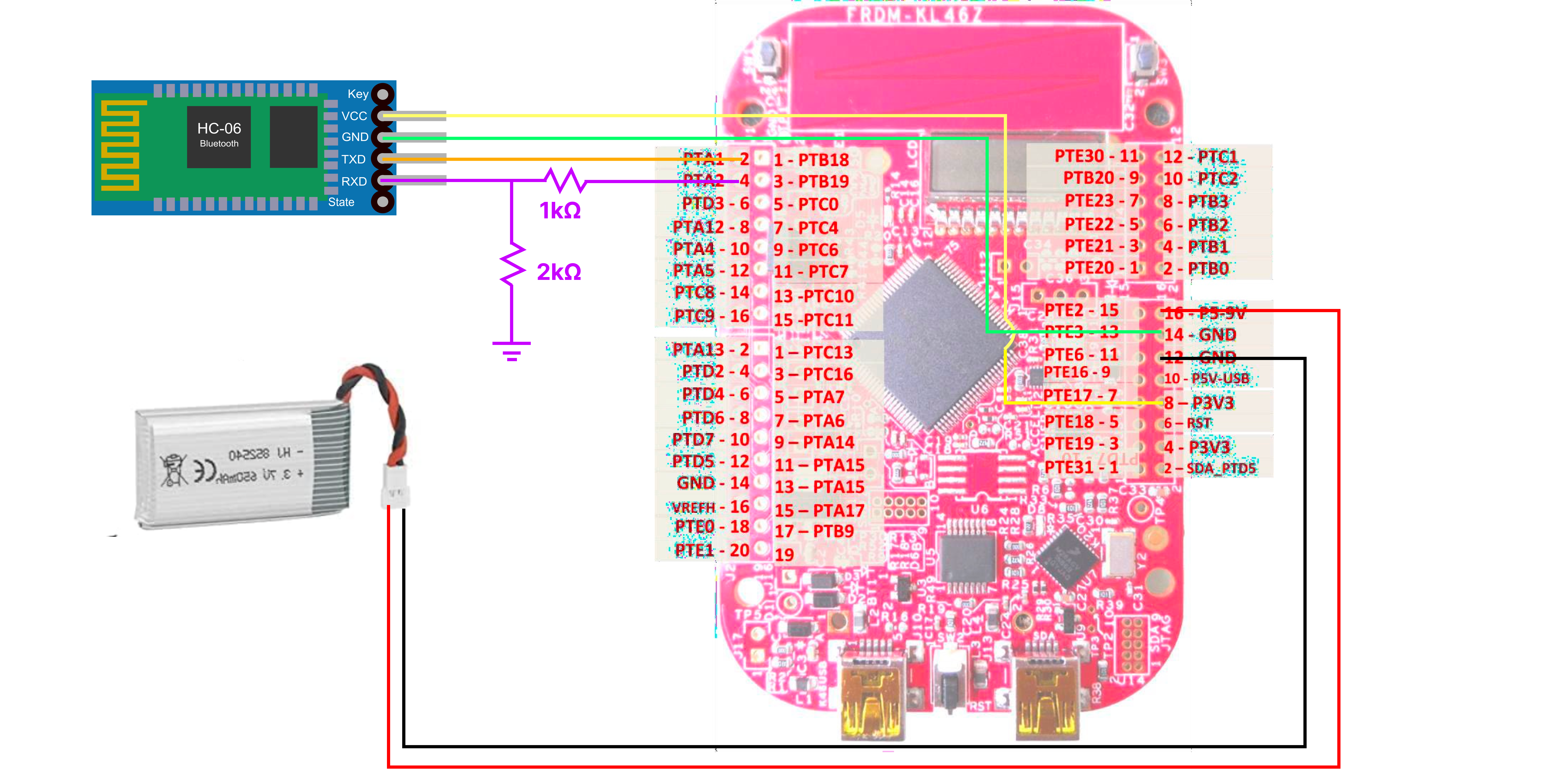
Figure 2: Hardware Schematic
Firmware (C, MCUXpresso)
- Drivers for UART (over OpenSDA/USB or HC-06 Bluetooth), I2C for the accelerometer, and a hardware timer that gives a 1 ms tick. The timer’s reload value is computed at boot from the actual bus clock — when we hardcoded it for an assumed bus frequency, the host’s clock-sync test caught the resulting drift, and deriving the value from the runtime bus clock fixed it.
- DSP filter: for each axis, an exponential moving average tracks the slow gravity component; the dynamic component is raw minus EMA. A small state machine watches the squared magnitude of the dynamic vector and captures the peak of each swing. Direction (Up / Down / Left / Right) is decided from the X-versus-Y ratio of that peak. A short cooldown after each detection keeps one wave from being counted twice.
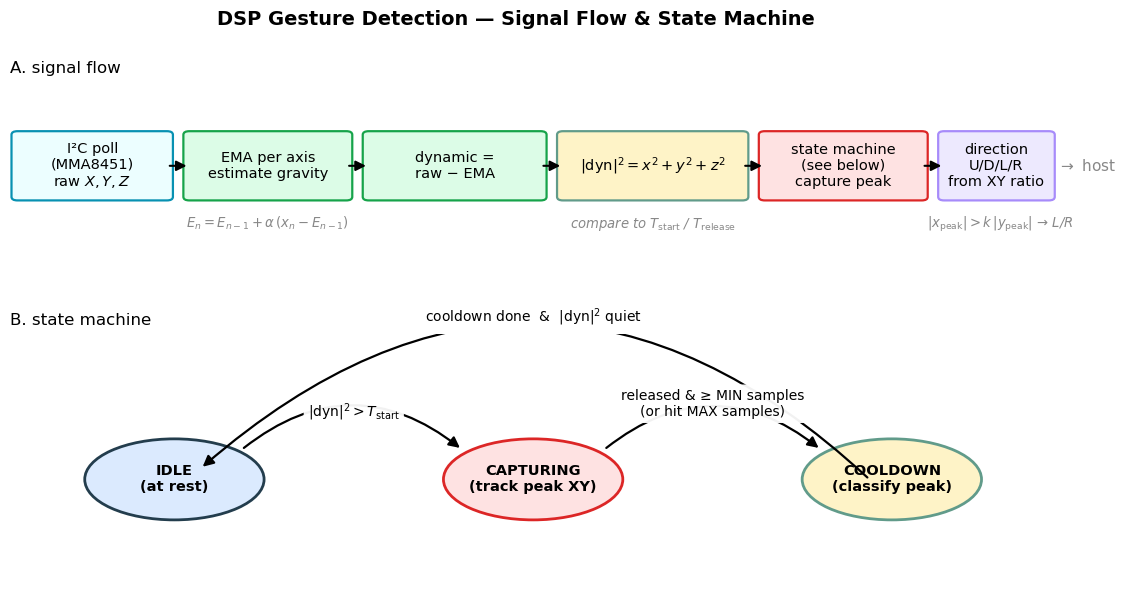
Figure 3: DSP Gesture-Detection
- Game logic: a 16-slot beat queue. The host enqueues beats a few seconds before their perfect time to the board. Swings are graded against the head of the queue; wrong-direction or late swings consume that head, and beats whose deadline passes are auto-missed. Every result — Perfect, Good, Miss, or auto-miss timeout — is reported back to the host as a single line of text. We intentionally put judging on the board rather than on the PC: serial or Bluetooth latency only delays when feedback appears on screen, not the actual grade, so a slow link doesn’t penalize the player.
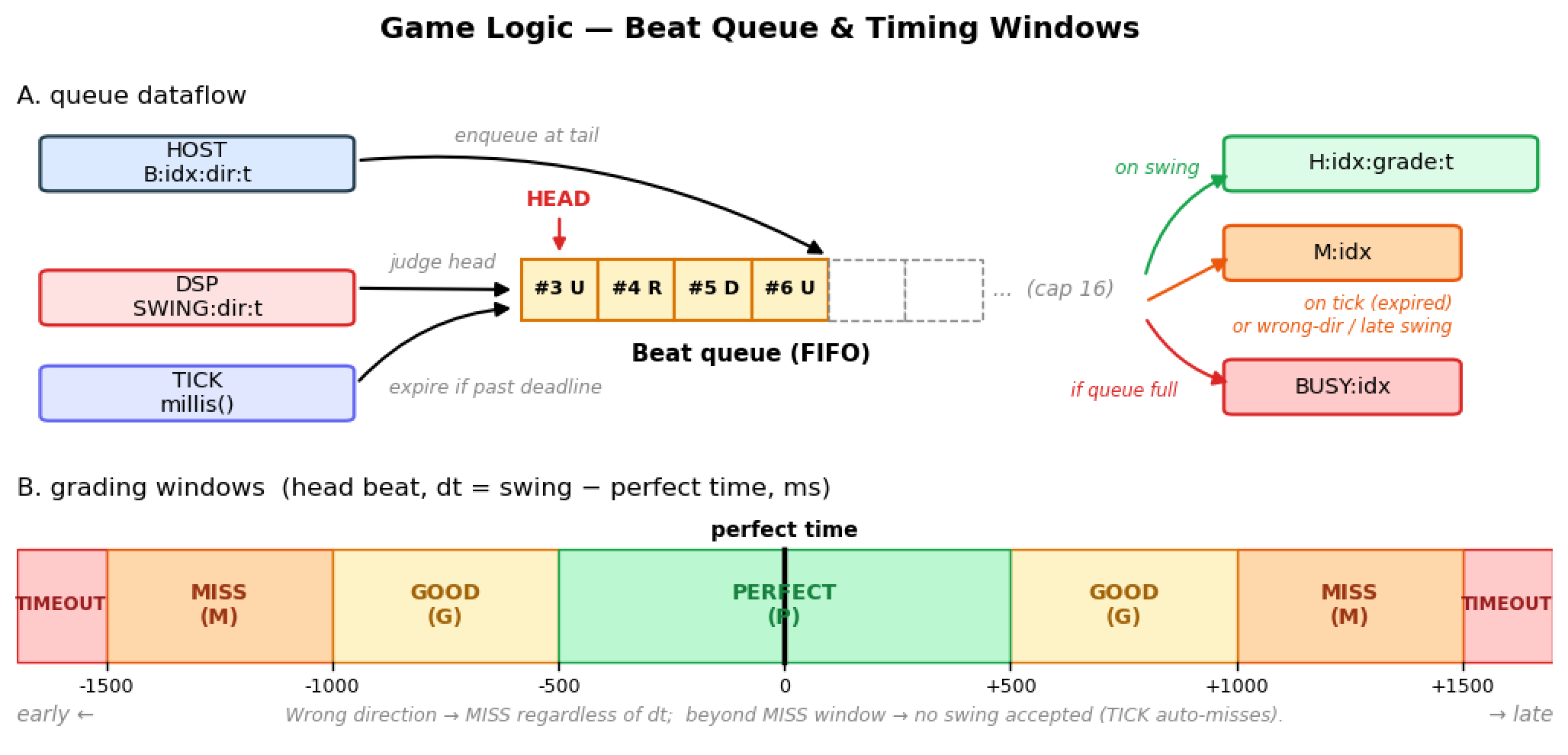
Figure 4: Game Logic Diagram
- Build modes: three compile-time modes select where the game protocol travels:
| Mode | UART use | When to use |
|---|---|---|
| Debug | USB + HC-06 | For development of bluetooth, both buses lives |
| USB | USB only | For development other than bluetooth |
| BT | HC-06 only | Real Game |
Wire protocol (board ↔ host)
| Direction | Message | Purpose |
|---|---|---|
| Host → Board | SYN\n |
Clock-sync request |
| Host → Board | B:<idx>:<dir>:<board_t_ms>\n |
Queue a beat |
| Board → Host | ACK:<board_ms>\n |
Reply to SYN |
| Board → Host | H:<idx>:<grade>:<actual_ms>\n |
Hit graded as Perfect / Good / Miss |
| Board → Host | M:<idx>\n |
Auto-miss timeout |
| Board → Host | BUSY:<idx>\n |
Queue full, beat dropped |
| Board → Host | SWING:<dir>:<ms>\n |
Raw swing detected |
| Board → Host | BOOT, INIT:*, MODE:* |
Boot diagnostics |
Host (Python + pygame)
The playback position pygame reports is the host’s source of truth for where in the song we are. A single reader thread owns the serial port and routes incoming lines into two queues — one for clock-sync replies, one for game events. Writes go through a lock so the background sync doesn’t interleave bytes with the game thread’s beat dispatches.
A periodic clock-sync thread issues a SYN every five seconds, parses the ACK, and EMA-smooths the host↔board offset. Each beat’s host-time target is converted to board-time before being sent, so the host pre-aligns every dispatch to the board’s clock and drift over a whole song stays within a few tens of milliseconds.
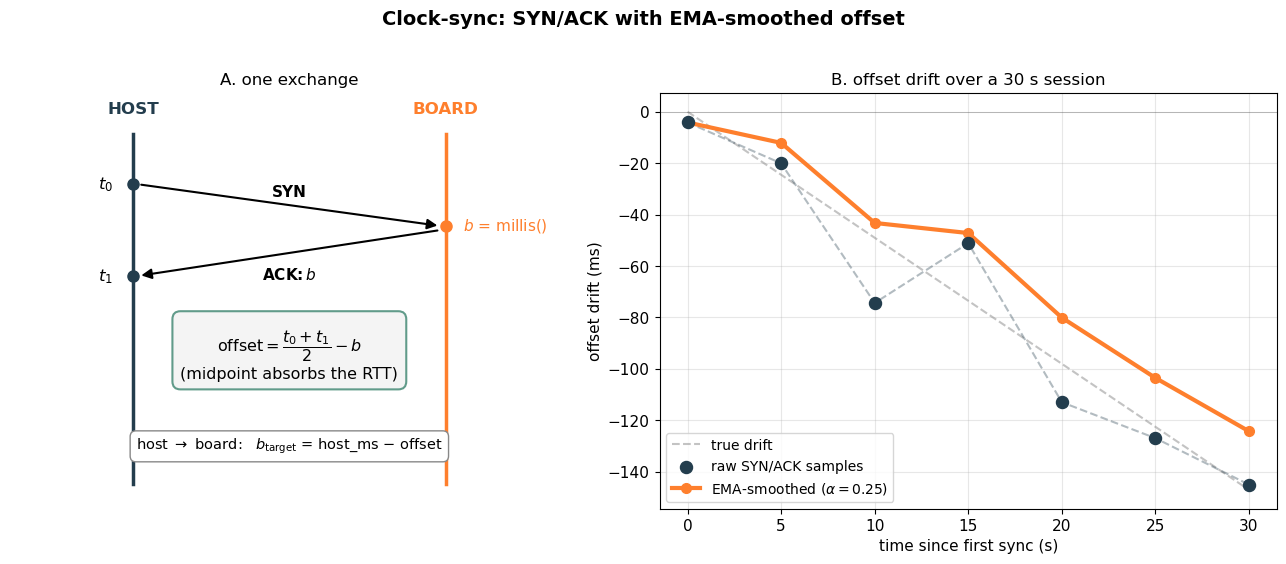
Figure 5: Clock Synchronization Structure
The renderer draws falling arrows that descend from the spawn line to the judgment line over a fixed travel time, plus the live HUD and the end-screen rank. An arrow disappears from the lane the moment the matching grade or timeout event arrives.
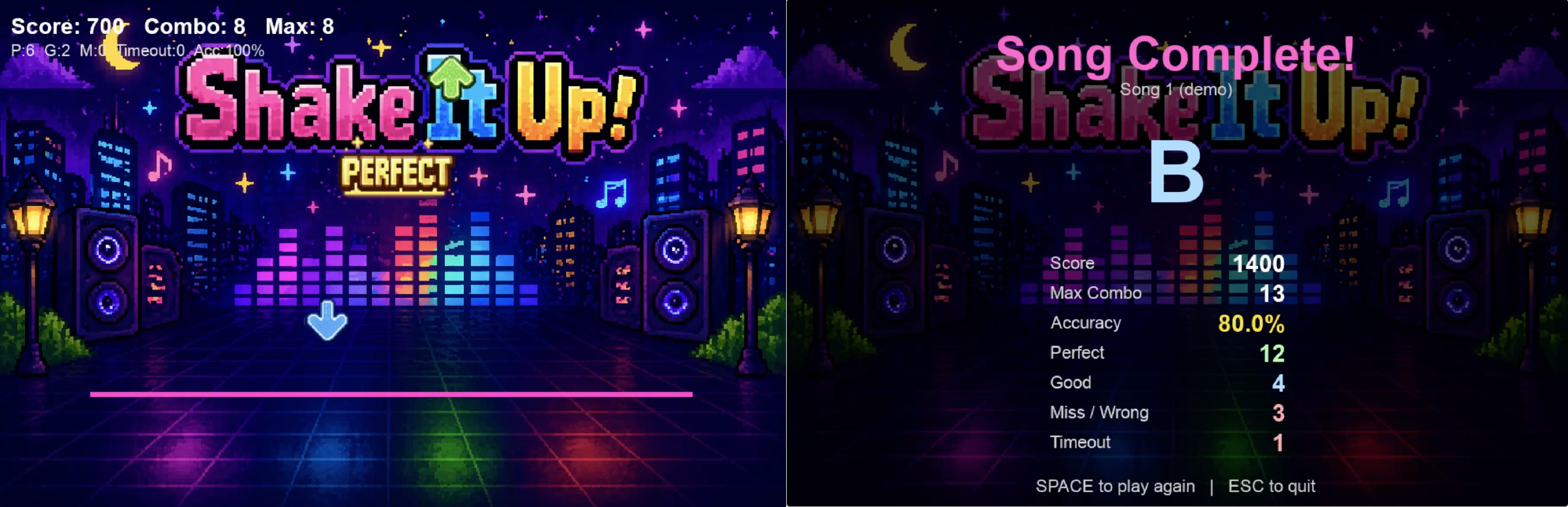
Figure 6: Game Snippet
Beatmap
{
  "title": "Song 1 (demo)",
  "song":  "song1.mp3",
  "lead_in_ms": 0,
  "notes": [
    {"t": 1846, "dir": "U"},
    {"t": 2769, "dir": "R"},
    ...
  ]
}
t is song-relative ms. The host iterates through the list and dispatches each beat when its perfect time falls within the lookahead window of the current song position.
Testing
We tested the system layer by layer before running full end-to-end play sessions. Two notebooks supported this process: Python-PC/demo.ipynb was used during firmware bring-up to exercise the protocol and tune DSP behavior, while Python-PC/test.ipynb collected the qualitative checks and small quantitative measurements used for threshold tuning.
Accelerometer and Gesture Recognition
- Verified raw X/Y/Z accelerometer readings across board orientations and small tilts to confirm the gravity vector and axis responses were correct.
- Tested the EMA gravity-removal filter: slow tilts stayed near zero in the dynamic signal, while sharp swings produced clear spikes.
- Ran structured gesture trials with randomized Up / Down / Left / Right prompts. A typical 20-prompt run classified about 16 correctly; most errors came from ambiguous diagonal motions, which the ratio cutoff intentionally rejects.
- Tuned the start/release thresholds and cooldown so intentional swings register once, gentle players are still detected, and the board produces zero false swings when left still for 60 seconds.
Bluetooth Communication and Signal Stability
- Confirmed the HC-06 paired with the laptop, created a stable virtual serial port, and recovered cleanly after disconnect/reconnect cycles.
- Matched the HC-06 baud rate to the firmware build and verified uncorrupted message exchange over both USB and Bluetooth.
- Measured 30 SYN/ACK round trips per transport: USB averaged a few milliseconds, while Bluetooth stayed around 25–50 ms with occasional larger outliers, still within our timing-window budget.
- Monitored the 5-second clock-sync loop over 60 seconds and verified that EMA smoothing kept the host↔board offset within a few milliseconds during gameplay.
- Tested wireless range by moving around the room mid-song; the connection stayed stable under normal player movement.
Python and GUI: Interaction and Synchronization
- Played the demo song end-to-end and confirmed falling arrows reached the judgment line at their intended beat times.
- Scheduled single-beat tests with a countdown and checked that the board’s Perfect / Good / Miss reports matched the configured timing thresholds.
- Verified that arrow lanes, feedback images, score, combo, grade counts, final accuracy, and rank updated correctly from board events.
- Tested replay behavior and confirmed all per-song state reset cleanly after restarting.
- Checked edge cases: early swings are ignored, late swings become Miss, timeout beats auto-miss, and graded arrows disappear as soon as their result arrives.
Resources
Work Distribution
The initial planning and system architecture were completed collaboratively. Yihan focused on the DSP filtering, MMA8451 driver, the host serial & clock-sync layer, and the Python GUI. Felicia focused on the hardware wiring, game-logic firmware (queue + judging), and Bluetooth HC-06 integration. We helped modify each other’s code and bring-up whenever one of us hit a problem, and met frequently to debug and tune the human-facing pieces (timing windows, DSP thresholds, dispatch lead) together. Both of us have a working understanding of every part of the project and contributed an equal amount of work to the final system.
AI Usage
We utilized GPT-5 to produce our visual assets. This included generating the game background, the directional arrows (up.png, down.png, left.png, right.png), and the real-time performance signals (perfect.png, good.png, miss.png) used for user feedback.
Gemini helped us to understand the pygame, game UI and audio player parts of the code.
No line of code was written by Generative AI.